Lead Capture Form Notion + Slack via n8n n8n
The manual lead management grind is real. Someone fills out your contact form, and then what? You get an email notification (maybe), you copy the info into your spreadsheet or CRM (eventually), and you tell your team about it (hopefully). Every step is a chance for something to fall through the cracks.
The full automation, in your inbox
Lead Capture Form → Notion + Slack via n8n

Lead Form → Notion + Slack | n8n
Requirements: what you'll need first.
! You'll needRequirements: what you'll need first.
- n8n instance: Either n8n Cloud or a self-hosted installation
- Notion account and integration: Create a Notion integration at notion.so/my-integrations, then share your target database with the integration
- Notion database: A database with at least Email and FirstName properties (you can add more as needed)
- Slack workspace and app: Create a Slack app at api.slack.com with chat:write and channels:read permissions, then install it to your workspace
- Slack channel: A channel where you want lead notifications to appear (the bot must be invited to this channel)
The full automation, in your inbox
Step-by-step n8n workflow breakdown.
01 Step 01Lead Capture Form — Configure the Form Trigger.
The Form Trigger node is where everything starts. This node creates a web form that n8n hosts for you—meaning you don’t need any external form builder or additional hosting. When someone submits the form, it triggers the rest of the workflow.
What makes this approach powerful is the embedding capability. Once your workflow is active, you get a production URL that you can embed in any website using an iframe. Your visitors see a clean form integrated into your site, but behind the scenes, n8n is handling the submission and routing the data automatically.
 Parameters
- Form URLs: n8n generates two URLs—a Test URL for development and a Production URL for your live form. Use the Test URL while building and testing, then switch to Production when you’re ready to go live.
- Authentication: Set to
Nonein this configuration, making the form publicly accessible. If you need to restrict access, you can add basic auth or other authentication methods. - Form Title: Set to
Lead Capture Form—this appears as the heading on your rendered form. Customize this to match your use case. - Form Description: A text area where you can add context for form visitors.
- Form Elements: Three fields configured:
FirstName(Text Input),LastName(Text Input),Email(Text Input)
02 Step 02Notion — Auto-Save Lead to Your Database.
The Notion node takes the form submission data and creates a new row in your lead database. This gives you a centralized, searchable repository of all your leads—complete with timestamps, status fields, and whatever other properties you’ve set up in your Notion database.
The key here is the property mapping. The node pulls values from the form submission using n8n expressions, then maps them to the corresponding columns in your Notion database. This happens instantly, so by the time you get the Slack notification, the lead is already in your database.
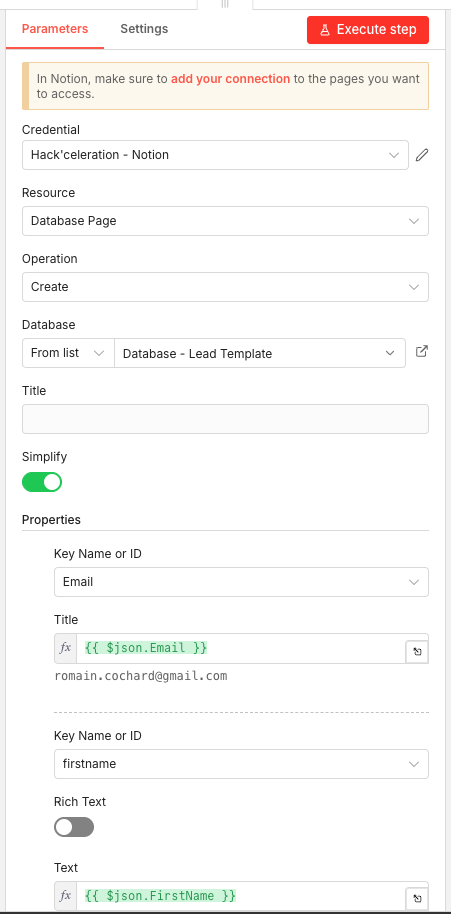
 Parameters
- Credential: Select your Notion credential configured in n8n. You’ll need to create a Notion integration and connect it to your workspace first.
- Resource: Set to
Database Page—this tells n8n you want to create a new page (row) within a Notion database. - Operation: Set to
Create—each form submission generates a new database entry. - Database: Uses
From listselector, then choose your target database. - Simplify: Toggle ON—this cleans up the API response.
- Properties:
- Email (Key Name): Maps to
{{ $json.Email }} - firstname (Key Name): Maps to
{{ $json.FirstName }}
- Email (Key Name): Maps to
03 Step 03Slack — Instant Team Notification.
The Slack node closes the loop by alerting your team immediately when a new lead comes in. The message includes the lead’s full name and email, giving your team everything they need to follow up—without having to check Notion or wait for a daily digest.
This node runs in parallel with the Notion node, meaning both actions happen simultaneously. There’s no delay between database entry and team notification.
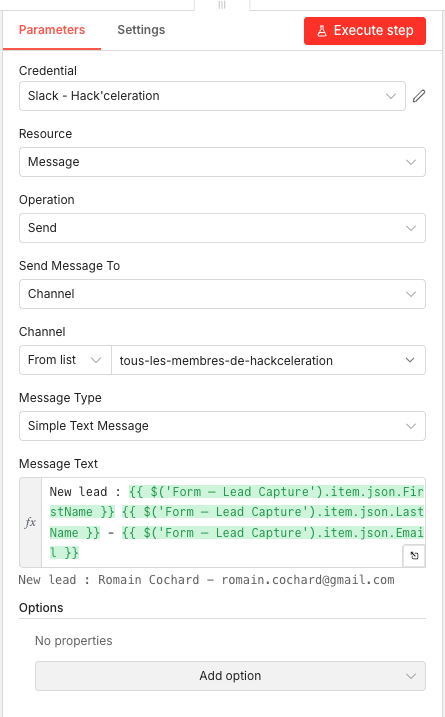
Parameters- Credential: Select your Slack credential configured in n8n. You’ll need a Slack app with the necessary permissions (chat:write, channels:read at minimum).
- Resource: Set to
Message—the node will send a Slack message. - Operation: Set to
Send—creates and sends a new message. - Send Message To: Set to
Channel—targets a Slack channel rather than a direct message. - Channel: Uses
From listselector, then choose your target channel. - Message Type: Set to
Simple Text Message—plain text formatting. - Message Text: Uses an n8n expression:
New lead: {{ $('Lead Capture Form').item.json.FirstName }} {{ $('Lead Capture Form').item.json.LastName }} - {{ $('Lead Capture Form').item.json.Email }} - Options: No additional options configured.
Get the ready-to-import n8n JSON plus the install guide
Drop your email and we'll send you the complete scenario.
- n8n JSON ready to import
- Written setup guide
- Video tutorial included
Why Automating Lead Capture is a Game-Changer for Your Team
Every business knows leads are the lifeblood of growth. But the way most teams handle lead capture creates unnecessary friction and risk at every step.
The problems with manual lead management:
- Form submissions get buried in email notifications that you might miss or delay reading
- Copy-pasting lead info into spreadsheets or CRMs is tedious and error-prone
- Your team doesn’t find out about new leads until someone remembers to tell them
- No centralized view of all leads makes it hard to track follow-up status
- Hot leads go cold while you’re busy with other tasks
What changes when you automate:
- Every single lead is captured instantly—no exceptions, no human memory required
- Data goes directly into your Notion database, organized and searchable from day one
- Your team gets notified in real-time, enabling follow-up within minutes instead of hours
- The form is fully customizable and embeddable on any website
- You can scale to hundreds or thousands of leads without adding manual work
The compound effect is significant. A team that responds to leads within 5 minutes is dramatically more likely to convert them than a team that responds within an hour. This workflow makes that kind of response time automatic rather than aspirational.
The full automation, in your inbox.
n8n JSON, guide and video tutorial.
- Complete n8n scenario
- Setup documentation
- Video walkthrough