Turn any YouTube video into ready-to-post TikTok clips
The full automation, in your inbox
Turn any long YouTube video into ready-to-post TikTok clips

Spending hours cutting your YouTube videos and uploading them one by one? This workflow does it for you — download, split, brand, post — in a single run.
Just copy-paste the ready-to-use scenario, enter your video URL, and let n8n handle the rest: download, cut into vertical format, add an animated branded title, and upload to TikTok via their official API. 100% automated, no coding.
Each node is documented inline so you can tweak clip duration, fonts, colors or the branding stamp in 2 clicks.
Requirements: self-hosted n8n, FFmpeg & API keys.
! You'll needRequirements: self-hosted n8n, FFmpeg & API keys.
- A self-hosted n8n instance (Docker / VPS) with terminal access.
- FFmpeg & FFprobe installed inside your n8n container. Tip: ask ChatGPT "Install FFmpeg in n8n Docker" or contact us if you get stuck.
- An Apify account with a token for the YouTube Video Downloader actor.
- An Upload-Post account (or other upload service) with an API key to publish clips.
- Write access to
/tmp— this is where clips are generated before upload.
The full automation, in your inbox
n8n workflow breakdown — YouTube → TikTok auto-clipping.
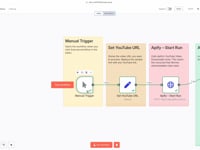
01 Step 01Launch the workflow (manual trigger).
Start with a Manual Trigger to run the scenario step-by-step and validate each part before automating it fully.
Demonstration of the n8n Manual Trigger node: click "Execute Workflow" to manually test the automation that downloads a YouTube video, slices it into TikTok clips, and uploads them to the platform.
Settings- Trigger type: Manual Trigger
- Usage: click "Execute Workflow" to start the test manually
02 Step 02Set the YouTube video URL.
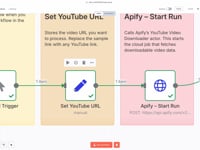
This step lets you define the URL of the YouTube video you want to convert into TikTok clips. The value entered here will be passed to the Apify actor to trigger the download process.
The Set – YouTube URL node lets you input the video link you want to process. This URL is passed to the Apify scraper to download the original video before cutting and posting to TikTok.
Settings- Node type: Set
- Field name:
youtubeURL - Value: the full URL of the YouTube video to process
- ➡️ Edit manually for testing, or make it dynamic (form, external API…).
03 Step 03Start YouTube scraping (HTTP request).
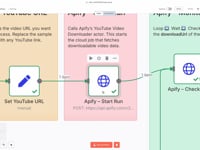
Trigger the YouTube Video Downloader actor from Apify using a POST request and your API token.
Configure the HTTP Request – Start Run node to trigger the YouTube video download via the Apify API. Headers, token, and JSON payload are set to launch the scraping process.
Parameters- Endpoint:
/acts/epctex~youtube-video-downloader/runs - Method: POST — JSON body (URL + 720p quality)
- Header:
Authorization: Bearer <APIFY_TOKEN>
- Endpoint:
04 Step 04Check if the run is completed (If + Wait).
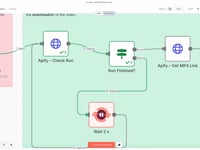
A loop of HTTP Request → If → Wait continuously checks the Apify run status every 2 seconds until it returns
SUCCEEDED.Automated monitoring loop: the HTTP Request – Check Status node monitors Apify's execution, the If node checks for a
SUCCEEDEDstatus, and the Wait node loops every 2 seconds until the YouTube video is ready.Loop- Wait: 2 seconds
- Condition:
data.status == "SUCCEEDED"
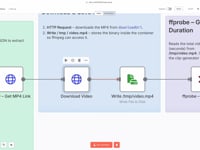
05 Step 05Download the MP4 file (HTTP request + write file).
Fetch the binary stream and save it to
/tmp/video.mp4using the Read/Write File node in n8n.The HTTP Request – Get MP4 Link node queries the Apify API to retrieve the direct video file URL, which is then saved locally (
/tmp/video.mp4) for FFmpeg to process into TikTok-ready clips.Parameters- HTTP Request: GET
{{downloadUrl}}— "Send Binary Data" ON - Write File:
/tmp/video.mp4
- HTTP Request: GET
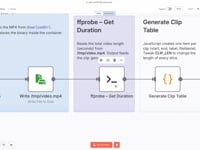
06 Step 06Measure duration with FFprobe.
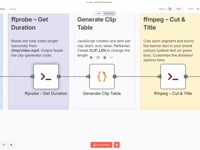
ffprobereturns the total video length (in seconds), used to calculate how many clips to generate.Execute Command – FFprobe node running
ffprobe -show_entries format=durationto determine the exact duration of the video. The output (stdout) is used to calculate how many TikTok clips need to be generated.Parameters- Command:
ffprobe … /tmp/video.mp4 - Output: CSV value → parsed by the Code node
- Command:
07 Step 07Generate the clip list (Code node).
A JavaScript script generates one item per clip: start, end, label ("Part n"), and fileName.
The Code node dynamically creates a list of clip metadata, each segment lasting 59 seconds: start time, end time, label (Part 1, Part 2…), and filename. This metadata drives FFmpeg to automatically cut the YouTube video into TikTok-ready clips.
Parameters- Variable:
CLIP_LEN = 59seconds (editable) - Output: JSON array used for automatic slicing
- Variable:
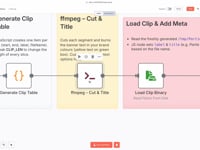
08 Step 08Slice and brand each clip with FFmpeg.
ffmpegsplits the main video into clips and overlays a green banner (#1EA4B8) with yellow text (#FDBB29) saying "Part n – hackceleration.com".The Execute Command – FFmpeg node slices the video into segments, automatically overlays the text "Part X – hackceleration.com", and then loops through each clip using Split In Batches to prepare for TikTok upload.
Parameters- Loop: Split in Batches → one clip at a time
- Command:
-ss {{start}} -to {{end}} … drawtext …
09 Step 09Auto-upload each clip to TikTok.
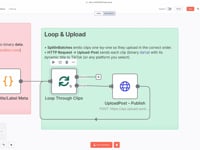
The final HTTP Request node pushes every generated clip to the
Upload-Post APIand publishes it automatically to TikTok with a dynamic title like Part X. No manual action needed — publishing runs on autopilot.Each generated clip is sent to the Upload-Post API and automatically published on TikTok with a dynamic title. Fully automated, no manual action required.
Parameters- Target: Upload-Post API endpoint
- Title format: "Part X" (dynamic per clip)
Get the ready-to-import n8n JSON — plus the install guide
Skip the setup headache. Drop your email and we'll send you the complete scenario, documented step by step, ready to paste into your n8n instance.
- n8n JSON file
- Full video walkthrough
- Install & FFmpeg guide
- Branding customization
Why auto-clipping YouTube into TikTok clips supercharges your content.
Consistent feed, zero editing
The workflow detects video length, cuts, brands, and posts everything for you. Your TikTok stays active without hours in a video editor.
Visual consistency, every clip
Every "Part n" clip ships with your branding, your link, and an optimized title — turning every viewer into a potential lead.
Organic reach, unlocked
Turn one long YouTube video into a viral-ready short series. A simple growth lever to test multiple hooks and recycle content — for free.
Flexible, multi-platform
Use it as-is for TikTok, or extend to Instagram Reels and YouTube Shorts in 2 clicks by pointing at a different upload endpoint.
Common questions.
Do I need to know how to code?
No. The workflow is 100% no-code — paste the JSON into n8n, enter your API keys, and run it.
Can I customize the clip style?
Yes — fonts, colors, duration, and brand stamp are all editable in 2 clicks per node.
Which upload service do you use?
Upload-Post by default. Swap it for any TikTok upload API by pointing the final HTTP node at a different endpoint.
The full automation, in your inbox.
n8n JSON, written guide and video tutorial — everything to ship this in under 15 minutes.
- Ready-to-paste n8n workflow
- Full guide with screenshots
- Step-by-step video tutorial
- 100% free — no lock-in