
ELEMENTOR Make INTEGRATION: AUTOMATE ELEMENTOR WITH MAKE
ELEMENTOR MAKE INTEGRATION: AUTOMATE ELEMENTOR WITH MAKE
Need help automating Elementor with Make?
Our team will get back to you in minutes.
Why automate Elementor with Make?
The Elementor Make integration gives you access to 1 trigger designed specifically to monitor form submissions on your WordPress site. This means every contact form, lead generation form, registration form, or survey you've built with Elementor can now automatically feed data into your business workflows—no manual exports, no copy-pasting, no delays.
Significant time savings stand out as the primary benefit. Instead of checking your WordPress dashboard multiple times a day for new submissions, then manually entering that data into your CRM or sending follow-up emails, Make handles everything automatically. A form submission at 3 AM? It's processed instantly. A surge of 50 leads during a campaign? Each one routed correctly without you lifting a finger.
Improved responsiveness transforms how quickly you can engage with prospects. When someone fills out your contact form, you can automatically send a personalized email within seconds, create a task in your project management tool, notify your sales team on Slack, and add the contact to your CRM—all before you've even seen the submission. This speed dramatically increases conversion rates and customer satisfaction.
Here's what you can build: automatically add Elementor form leads to HubSpot or Salesforce, send instant confirmation emails via Gmail or Mailchimp, create Trello cards for new project inquiries, log submissions to Google Sheets for reporting, trigger SMS notifications for high-priority requests, or schedule calendar appointments based on form data. The possibilities multiply with Make's 1,500+ app connections.
How to connect Elementor to Make?
! 1 stepHow to connect Elementor to Make?
- 01
Add the node
The Elementor integration with Make uses a Webhook-based connection that links your WordPress site to your Make scenarios. Here's how to set it up:Basic configuration:Create a new scenario in Make: Log into your Make account, click "Create a new scenario," and search for "Elementor" in the app directory.Add the Elementor trigger module: Select the "Watch Forms" trigger as your scenario's starting point.Generate the webhook URL: Make will provide you with a unique webhook URL. Copy this URL—you'll need it for the next step.Configure Elementor in WordPress: Go to your WordPress dashboard, navigate to Elementor → Settings → Integrations, and add a new webhook integration. Paste the Make webhook URL and select which forms should send data to it.Test the connection: Submit a test entry through your Elementor form. Return to Make and verify the data appears correctly in the trigger module.For advanced automation scenarios, you might also want to explore n8n as an alternative automation platform.
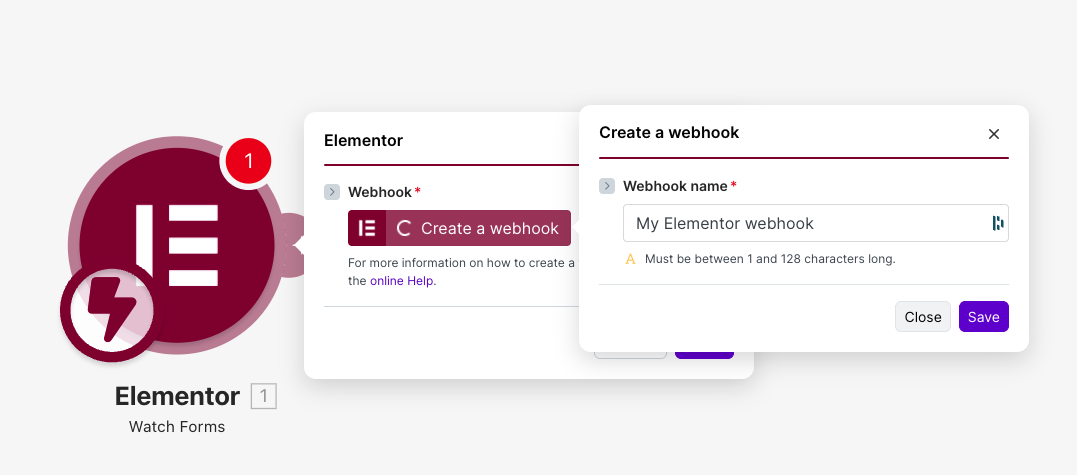 TIP💡 TIP: Before connecting your live forms, create a test form in Elementor specifically for testing your automation. This lets you submit multiple test entries without cluttering your real lead data. Once everything works perfectly, simply add your production forms to the webhook configuration. Check the official Make documentation for detailed setup instructions.
- 01
Need help automating Elementor with Make?
Our team will get back to you in minutes.
Elementor triggers available in Make
01 Trigger 01Watch Forms
The Watch Forms trigger is the cornerstone of Elementor automation in Make. It monitors your Elementor forms in real-time and fires your scenario the instant someone submits a form on your website. This trigger captures all form field data—names, emails, phone numbers, custom fields, hidden fields, and any other information you've configured in your Elementor form builder.
Configuration overview: The trigger works through a webhook connection established between your WordPress site and Make. Once configured, you can select specific forms to monitor or watch all forms site-wide. The module automatically detects the structure of your forms and maps each field to usable data in your Make scenario.
- Webhook URL: The unique endpoint generated by Make that receives form submissions. This is required and must be added to your Elementor webhook settings.
- Form Selection: Depending on your Elementor configuration, you can filter which forms send data to this specific webhook. Useful for routing different form types to different automations.
Typical use cases:
- Lead nurturing sequences: Trigger an email drip campaign in Mailchimp or ActiveCampaign when someone downloads a resource through your form
- CRM population: Automatically create or update contacts in HubSpot, Pipedrive, or Salesforce with every form submission
- Team notifications: Send Slack or Microsoft Teams messages when high-value leads submit your contact form
- Data logging: Append every submission to a Google Sheet or Airtable base for reporting and analysis
- Appointment scheduling: Create calendar events in Google Calendar or Calendly based on booking form data
When to use this trigger: Use Watch Forms whenever you need to act on form submissions without delay. It's ideal for lead capture workflows, customer support intake, event registrations, quote requests, or any scenario where form data needs to flow automatically into other business systems. The real-time nature ensures no submission slips through the cracks, even during peak traffic periods or outside business hours.
Build your first workflow with our team
Drop your email and we'll send you the catalog of automations you can ship today.
- Free n8n & Make scenarios to import
- Step-by-step setup docs
- Live cohort + community support
Frequently asked questions
Is the Elementor Make integration free to use?
The Elementor integration itself is available on all Make plans, including the free tier. However, your usage depends on Make's operation limits—the free plan includes 1,000 operations per month, which covers most small to medium form volumes. Each form submission processed counts as one operation, plus additional operations for each subsequent module in your scenario. For high-traffic websites or complex multi-step automations, you may need a paid Make plan. On the Elementor side, the webhook functionality works with both Elementor Free and Elementor Pro, though some advanced form features require Pro.What form data can I capture from Elementor with Make?
The Watch Forms trigger captures all data submitted through your Elementor forms. This includes standard fields like name, email, phone, and message, as well as custom fields you've created—dropdowns, checkboxes, radio buttons, date pickers, file uploads, and hidden fields. You also receive metadata such as the submission timestamp, the page URL where the form was submitted, and the user's IP address (if configured). Each field becomes a mappable data point in Make, allowing you to route specific information to different destinations in your workflow.How long does it take to set up the Elementor Make integration?
Most users complete the basic setup in under 10 minutes. The process involves three main steps: adding the Elementor module in Make, copying the webhook URL, and pasting it into your Elementor settings in WordPress. Testing takes another few minutes. Building out a complete workflow with multiple steps (like adding to a CRM, sending emails, and logging to a spreadsheet) typically takes 20-30 minutes for a first-time Make user, or just 5-10 minutes if you're familiar with the platform. No coding knowledge is required—everything is configured through visual interfaces. For complex enterprise workflows, consider working with our automation agency to accelerate deployment.